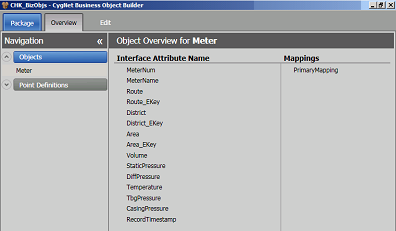
Starting the CygNet Business Object Builder (CygBOB) displays the Overview window, where elements of the selected Business Object Package File can be viewed at a glance.
Use the Navigation pane on the left to select an Object or a Point Definition. The Overview pane on the right displays Interface Attribute Names and Mappings for the element selected.
To open the Editor for a displayed Interface Attribute Name or its Mappings, double-click on the element name in the Overview pane. The associated Editor will open in the Edit window.
Options available in the Overview window include the following.
| Option | Description |
|---|---|
 |
Expands the list of Objects or Point Definitions displayed. |
 |
Collapses the list of Objects or Point Definitions displayed. |
 |
Pins the Navigation Menu to the sidebar. |
 |
Unpins the Navigation Menu from the sidebar. |
| Navigation pane | Displays the available Objects and Point Definitions. This pane may be pinned to the side, allowing for a larger Overview pane view. |
| Objects | Lists the Business Objects belonging to the currently selected package. The list may be displayed or hidden. |
| Point Definitions | Lists the Point Definitions belonging to the currently selected package. The list may be displayed or hidden. |
| Overview pane | Displays the Interface Attribute Names and Mappings for the selected Object or Point Definition. Double-clicking an element name opens its associated editor. |
| Interface Attribute Name | Displays the list of Interface Attributes associated with the selected Object or Point Definition for the currently selected Business Object Package. |
| Mappings | Displays the mappings associated with the selected Object or Point Definition for the currently selected Business Object Package. |

|
|
|

